> For the complete documentation index, see [llms.txt](https://docs.zkdx.io/llms.txt). Markdown versions of documentation pages are available by appending `.md` to page URLs; this page is available as [Markdown](https://docs.zkdx.io/guide/zkdx-staking-guide.md).
# zkDX Staking Guide
Welcome to zkDX Stake to Earn! Enjoy generous rewards
## **🌐 Connect Wallet** :briefcase:
* Prepare your wallet to connect to zkDX.
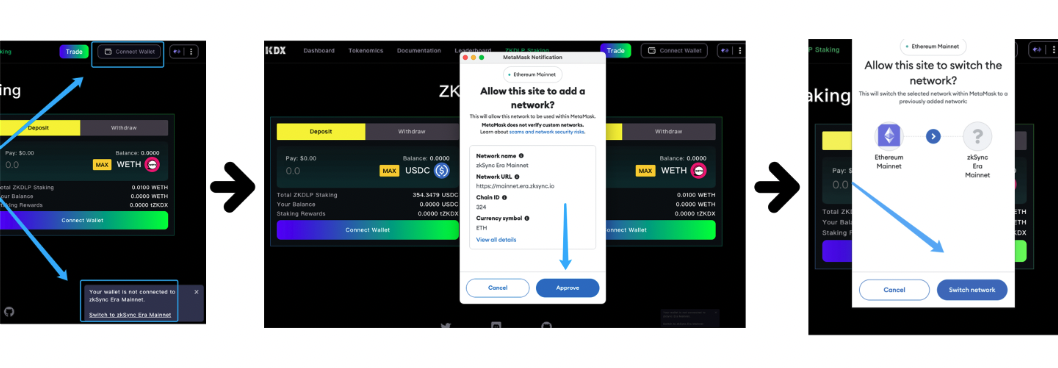
* Visit [zkDX Staking](https://app.zkdx.io/stakingliquidity), click to connect your wallet.
* If you haven't configured the zkSync network before, a prompt in the bottom right corner will suggest switching to the zkSync Mainnet.
Once connected, the page will display the connected address and network. Click the network icon to switch to other networks supported by zkDX.
### **🌉 Bridge Assets**
* zkDX currently supports staking of ETH and USDC. Bridge your assets from other networks by visiting [zkDX Bridge](https://app.zkdx.io/bridge).
### **💼 Stake To Earn**
**Deposit**
* Visit [zkDX Staking](https://app.zkdx.io/stake): Enter the amount of ETH or USDC you wish to stake 💸 -> Click "Approve" ➡️ "Deposit" ✔️.
**Withdraw**: **Switch to Withdraw**
* Click the 【claim esZKDX】button to withdraw only the $esZKDX reward of the stake.
* Enter an amount, such as 10, and then click【USDC & esZKDX】 to withdraw both 10 USDC & $esZKDX rewards.
🎉 **Congratulations!** You are now officially participating in stake to earn. Follow the page prompts to continuously receive $esZKDX as reward without any risk or loss. You can withdraw your assets anytime, but it's recommended to keep staking as long as possible to earn additional $ZKDX rewards from the Liquidity Reserve Program!
If you encounter any issues, please contact us in [Discord](https://discord.gg/ZukCWPaZbp) and get support. 🤝
#### **zkDX Official Links:**
Website: [https://zkdx.io](https://zkdx.io/#/)
Twitter:
Discord:
Docs: